Restocking System
TL;DR Version
The Restocking System is an Arcadia specific feature that can be accessed by pressing Ctrl+R by default. One is able to set up global and session-based item entries which are restocked in inventory and storage when interacting with the Kafra Storage.
Unless configured otherwise items will even be automatically bought when interacting with the Buy Window of an NPC.
Basic Function
The restock window automatically handles storing, refilling, or purchasing items from NPCs when interacting with Storage, Master Storage, Guild Storage, or Trading NPCs.
You can bind this window to a key of your choice on page 2 of the "Esc->Keyboard Settings->Window Interface."
You can choose between two settings:
- Global: Saves the settings for the entire master account, persisting even after logging out.
- Session: Saves the settings for the current character, lasting only until logout.
Examples
Example
Store
- Do you want to store all your
 Blue Herbs while farming Goats? Enter your target amount of Blue Herbs in Storage. Typically, just type "30000" and "Enable" the row.
Refill
- Need 50
 Fly Wings for each round? Type "50" in Inv. and Enable the row.
Store / Refill
- Hunting Bloody Butterflies that drop
 Butterfly Wing? Want to keep only 10 and store the rest? Use both entries: set "10" for Inv. and "30000" for Storage.
Buy
- When interacting with NPCs, you can buy items instead of simply refilling them. For the Global tab, consider using Only discount, so this row is affected only when you're using a merchant-class character with the skill Discount Lvl 10.
- To refill Fly Wings but never
 Berserk Potion, use the Never buy field for Berserk Potion.
Restocking mode
- Want to replenish your stock with Fly Wings? Then Restocking mode is your friend.
You can activate the mode while you are in storage. Then go to an NPC and you will automatically buy as many Fly Wings as you can fit in your inventory.
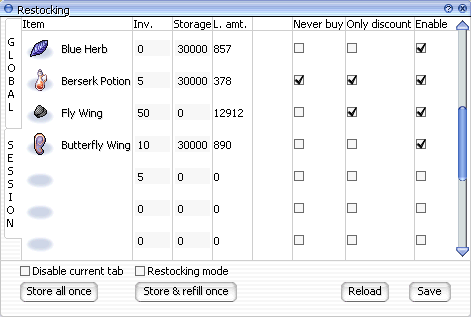
Controls in this window
| Control | Description |
|---|---|
| Global | Settings that apply to the entire master account |
| Session | Settings that apply to the current session until log-out |
| Item | Drag and drop items here to configure them |
| Inv. | Specify the desired quantity of the item to keep in your inventory |
| Storage | Specify the desired quantity of the item to keep in storage. Maximum: 30,000 |
| L. amt. | Displays the amount of the item currently in your storage once accessed |
| Never Buy | Enable if you never want to purchase this item from an NPC |
| Only discount | Enable if you only want to buy this item with a merchant class using the skill Discount Lvl 10 |
| Enable | Enable this option to activate the configuration for this item |
| Disable current tab | Enable if you want to disable all configurations in this tab (Global/Session) |
| Restocking mode | Activate the mode if you want to automatically buy the maximum possible amount of items from a trading NPC, according to the Storage field. (This mode will ignore the Inv. setting) |
| Store all once | Click to store all items according to their Storage field configuration. This will also store items configured to be kept in the inventory based on Inv. |
| Store & refill once | Click to store and refill items according to their configuration. (This is the default behavior when accessing your storage or a Trading NPC) |
| Reload | Click to reload a configuration saved on another client. (This is the default behavior when re-logging) |
| Save | Click to save your configuration. (This is the default behavior when closing the restocking window) |